8. Tag Assignment
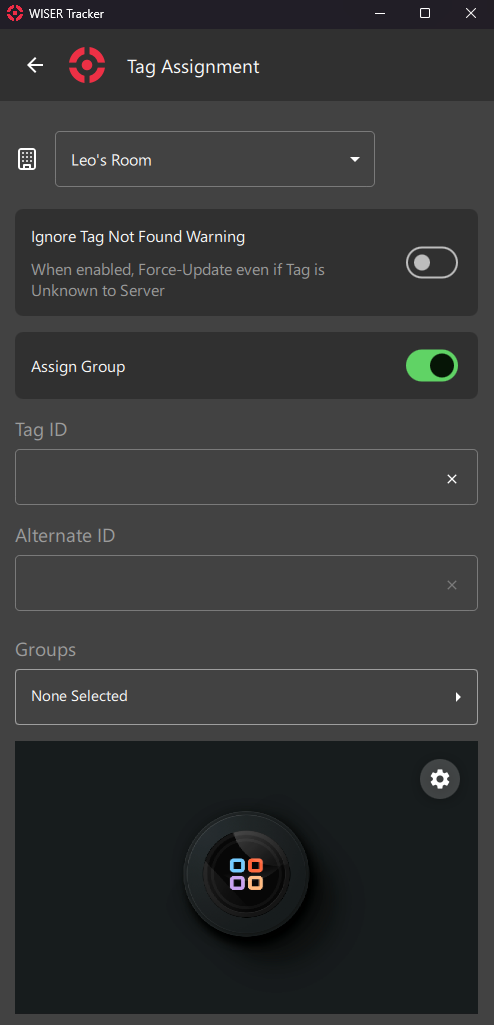
This Screen is a quick way of editing Tags. It works like a shortcut, available from the First Steps: Home Screen
It is usually used for Assigning new Tags or Setting up a new Work Order for a new Cycle of Operation.
A Barcode Scanner is also available for Devices with a Camera.
8.0.1 Arena Filter
Select the Arena you want to Assign Tags.
8.0.2 Special Options
8.0.2.1 Ignore Tag Not Found Warning
Sometimes recently arrived Tags still haven't got a Ping from the server and so, they are Unknown.
To avoid such warning and a Failed Update, you can toggle this option.
8.0.2.2 Assign Group
This option will enable/disable the Groups Field
8.0.3 Input Fields
8.0.3.1 Tag ID
Tag Hex ID
You can use a Keyboard, a Portable Barcode Scanner or your Device's Camera.
8.0.3.2 Alternate ID
You can use any kind of internal ID, like Work Order, Part Number and so on.
8.0.3.3 Groups
Select Pre-defined Groups
Info
Assign Group Option must be Enabled
8.0.4 Camera Preview
Camera-Available Devices will have a Preview Screen. You can click the Gear Icon for a few Settings and Camera Device Selection.